How do I add my new email signature to Outlook 2007-2010?
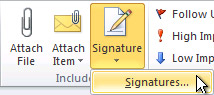
Open a new message. On the Insert tab, in the Include group, click Signature, and then click Signatures.
On the E-mail Signature tab, click New.
Type a name for the signature, and then click OK.
In the Edit signature box, paste in your generated signature and select OK
How do I add my new email signature to Newer versions of Outlook?
Open a new email message.
On the Message menu, select Signature > Signatures. (Depending on the size of your Outlook window and whether you're composing a new email message or a reply or forward, the Message menu and the Signature button might be in two different locations.)
Under Select signature to edit, choose New, and in the New Signature dialog box, type a name for the signature.
Under Edit signature, paste in your generated signature and select OK